 Waybid
AI bid review for freight tenders
See which estimates and supplier terms could affect your choice. After a round closes, request an AI review for a lane and check the evidence behind the draft.
Estimated ocean freight
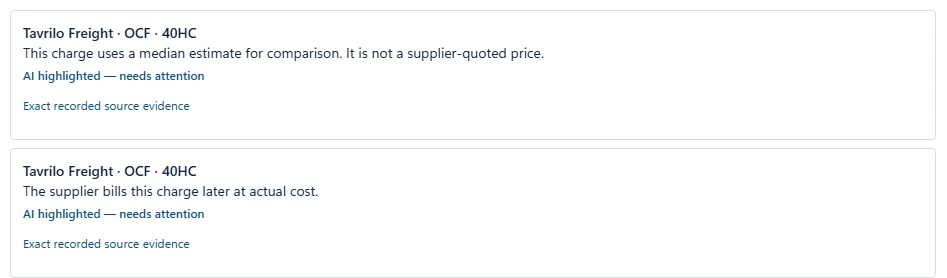
Tavrilo Freight quoted ocean freight at actual cost. Waybid used a median estimate to compare the offer, and the AI review flagged the charge for the buyer to check.
From closed bids to a reviewed draft
Request a review for the lane
Open the comparison for a closed round, choose a lane and request AI review. The comparison remains available while the review runs.
Follow the evidence
Check the quoted charges, estimates and supplier terms behind the findings. A charge billed at actual cost may use an estimate for comparison.
Decide how to proceed
Review or dismiss the draft in Waybid. Your buyer records any supplier choice or award in a separate step.
Review the draft recommendation
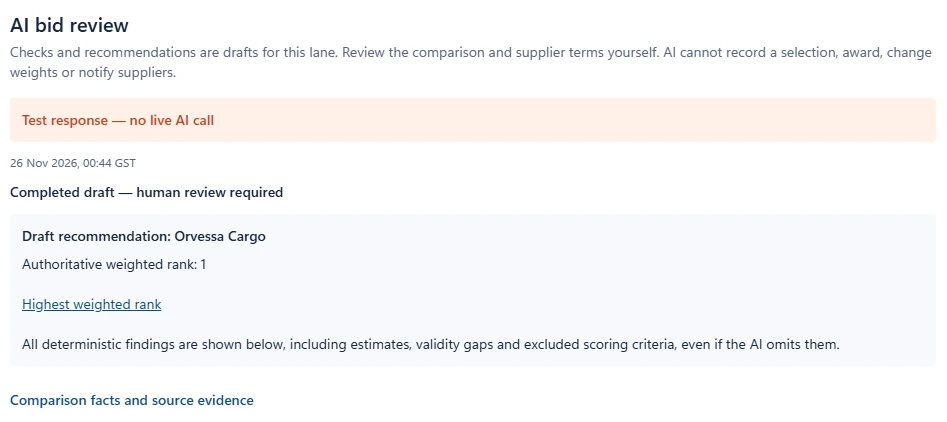
The draft links to comparison evidence, such as the highest weighted rank. The buyer can check that evidence against estimates and supplier terms before choosing an offer.
Where can I request AI review?
Open a lane in a closed freight comparison. The AI review request is available in enabled buyer workspaces. If the draft has insufficient evidence, it can leave the supplier recommendation open.