 Waybid
Check a road freight invoice against the award
Use the awarded quote to check one road freight invoice. Enter the billed charges and see which net amounts match the award, which differ and which need a closer look.
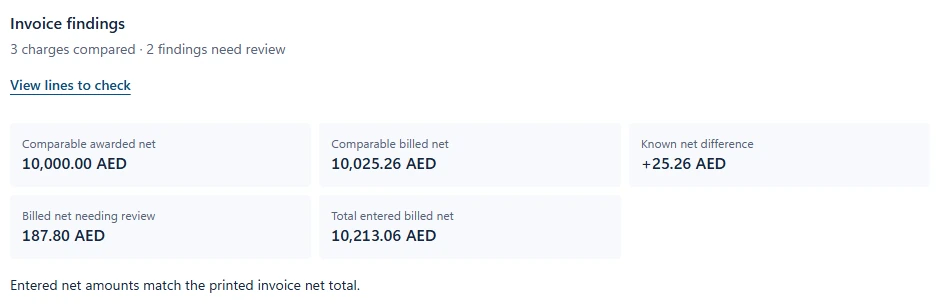
Sample invoice findings
Fictional road freight invoice · Amounts before VAT
- Comparable awarded net
- AED 10,000.00
- Known net difference On comparable charges
- +AED 25.26
- Billed net needing review Waiting time and an unmatched charge
- AED 187.80
Check billed charges against the agreed rates
Open Check invoice from the awarded RFQ
Choose the awarded Road lane. Check the route, supplier, currency, truck count and agreed rates.
Enter the invoice lines
Enter the invoice and job details and map billed lines to the awarded charges. Use the award currency and enter the printed net total if you want to check that the lines add up.
Review the differences
Review differences on comparable lines separately from waiting or charges you could not match. Check the supplier’s supporting documents and decide how to handle each item.
See what needs checking first
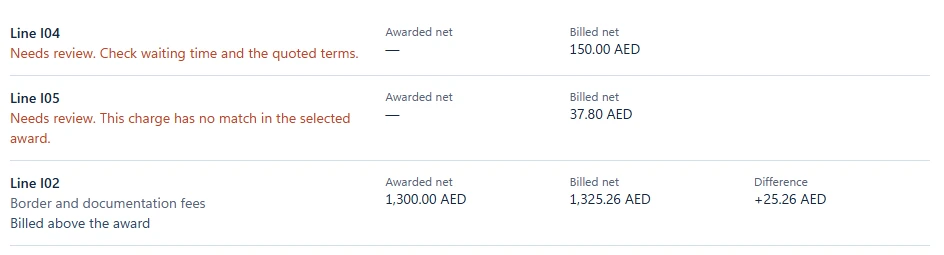
In this example, border and documentation fees are AED 25.26 above the award. The waiting line and an unmatched charge account for a separate AED 187.80 that the buyer can investigate.
Which invoices can I check?
Buyer admins and buyers can check one invoice covering a single, fully awarded Road lane in the award currency. Enter the details manually. Waybid shows a temporary preview, and the buyer handles invoice approval and payment separately.